[Инструкции] Как добавить меню приложений в miui 10
| Здравствуйте, в этом посте я вам покажу как добавить меню приложений в miui 10. Все действия проводились на смартфоне redmi note 7 с прошивкой miui 10.3.5.0 PFGRUXM. |

avatar.png (78.88 KB, Downloads: 13)
2019-08-31 16:53:44 Upload

avatar.png (132.11 KB, Downloads: 16)
2019-08-31 16:53:55 Upload
Сначала мы скачиваем последнюю версию альфа лаунчера miui по ссылке:

avatar.png (159.78 KB, Downloads: 11)
2019-08-31 16:55:51 Upload
После установки заходим в Google play и скачиваем приложение activity launcher

avatar.png (114.04 KB, Downloads: 10)
2019-08-31 16:58:19 Upload
Заходим с приложение и нажимаем на «все действия»-и ждём загрузку.

avatar.png (80.71 KB, Downloads: 8)
2019-08-31 16:57:31 Upload
После загрузки ищем пункт «Рабочий стол miui»-и нажимаем на него.

avatar.png (127.28 KB, Downloads: 6)
2019-08-31 17:00:55 Upload

avatar.png (142.96 KB, Downloads: 12)
2019-08-31 17:01:28 Upload
После нажимаем на «рабочий стол».
Потом появляется вот такая менюшка:

avatar.png (98.93 KB, Downloads: 6)
2019-08-31 17:02:20 Upload
Мы включаем «Рабочий стол с меню приложений»-и все готово.
Рейтинг





| А я уже и отвык от такой менюшки. Даже и не знал, что ее можно установить на родной MIUI без использования других лаунчеров. |

fyuuri ответил: 2019-08-31 14:29:44
А я уже и отвык от такой менюшки.
Даже и не знал, что ее можно установить на родной MIUI без использования других лаунчеров.
Эта фишка не так давно появилась. В китайских еженедельных прошивках и в прошивках на основе китайских еженедельных она, как положено, в настройках есть.
Evgeny Morozov
Эта фишка не так давно появилась. В китайских еженедельных прошивках и в прошивках на основе китайских еженедельных она, как положено, в настройках есть.

| quoteurl=home.php?mod=space&uid=6228183431fyuuri/url А дизайн этого меню изменить можно?/quote |
Темами. Но это все уже в MIUI 11 будет. Вчера/сегодня было последнее еженедельное обновление MIUI 10, больше обновлений не будет до выхода MIUI 11
А какая из версия без свайпа?
Так-то поиск приложений мне и не нужен, ведь пользуюсь лишь малой частью.
fyuuri
А какая из версия без свайпа?
Так-то поиск приложений мне и не нужен, ведь пользуюсь лишь малой частью.


Mi Comm APP
Получайте новости о Mi продукции и MIUI
Рекомендации
* Рекомендуется загружать изображения для обложки с разрешением 720*312
Изменения необратимы после отправки
Cookies Preference Center
We use cookies on this website. To learn in detail about how we use cookies, please read our full Cookies Notice. To reject all non-essential cookies simply click «Save and Close» below. To accept or reject cookies by category please simply click on the tabs to the left. You can revisit and change your settings at any time. read more
These cookies are necessary for the website to function and cannot be switched off in our systems. They are usually only set in response to actions made by you which amount to a request for services such as setting your privacy preferences, logging in or filling in formsYou can set your browser to block or alert you about these cookies, but some parts of thesite will not then work. These cookies do not store any personally identifiable information.
These cookies are necessary for the website to function and cannot be switched off in our systems. They are usually only set in response to actions made by you which amount to a request for services such as setting your privacy preferences, logging in or filling in formsYou can set your browser to block or alert you about these cookies, but some parts of thesite will not then work. These cookies do not store any personally identifiable information.
These cookies are necessary for the website to function and cannot be switched off in our systems. They are usually only set in response to actions made by you which amount to a request for services such as setting your privacy preferences, logging in or filling in formsYou can set your browser to block or alert you about these cookies, but some parts of thesite will not then work. These cookies do not store any personally identifiable information.
Кнопка меню приложений xiaomi
Указанная тема не существует, или находится на премодерации.
Cookies Preference Center
We use cookies on this website. To learn in detail about how we use cookies, please read our full Cookies Notice. To reject all non-essential cookies simply click «Save and Close» below. To accept or reject cookies by category please simply click on the tabs to the left. You can revisit and change your settings at any time. read more
These cookies are necessary for the website to function and cannot be switched off in our systems. They are usually only set in response to actions made by you which amount to a request for services such as setting your privacy preferences, logging in or filling in formsYou can set your browser to block or alert you about these cookies, but some parts of thesite will not then work. These cookies do not store any personally identifiable information.
These cookies are necessary for the website to function and cannot be switched off in our systems. They are usually only set in response to actions made by you which amount to a request for services such as setting your privacy preferences, logging in or filling in formsYou can set your browser to block or alert you about these cookies, but some parts of thesite will not then work. These cookies do not store any personally identifiable information.
These cookies are necessary for the website to function and cannot be switched off in our systems. They are usually only set in response to actions made by you which amount to a request for services such as setting your privacy preferences, logging in or filling in formsYou can set your browser to block or alert you about these cookies, but some parts of thesite will not then work. These cookies do not store any personally identifiable information.
Кнопка меню приложений xiaomi
Указанная тема не существует, или находится на премодерации.
Cookies Preference Center
We use cookies on this website. To learn in detail about how we use cookies, please read our full Cookies Notice. To reject all non-essential cookies simply click «Save and Close» below. To accept or reject cookies by category please simply click on the tabs to the left. You can revisit and change your settings at any time. read more
These cookies are necessary for the website to function and cannot be switched off in our systems. They are usually only set in response to actions made by you which amount to a request for services such as setting your privacy preferences, logging in or filling in formsYou can set your browser to block or alert you about these cookies, but some parts of thesite will not then work. These cookies do not store any personally identifiable information.
These cookies are necessary for the website to function and cannot be switched off in our systems. They are usually only set in response to actions made by you which amount to a request for services such as setting your privacy preferences, logging in or filling in formsYou can set your browser to block or alert you about these cookies, but some parts of thesite will not then work. These cookies do not store any personally identifiable information.
These cookies are necessary for the website to function and cannot be switched off in our systems. They are usually only set in response to actions made by you which amount to a request for services such as setting your privacy preferences, logging in or filling in formsYou can set your browser to block or alert you about these cookies, but some parts of thesite will not then work. These cookies do not store any personally identifiable information.
Как включить на Xiaomi меню приложений

В новой “пачке” обновлений от компании Xiaomi для смартфонов работающих с под управлением операционной системы Android с фирменной оболочкой MIUI 11 появилась долгожданная возможность оставлять ненужные приложения в специальном меню, а на рабочий стол выкладывать только используемые программы.
Что интересно, меню приложений изначально присутствует как в классической версии “чистого” Андроида, так и в оболочках различных производителей, но лишь сейчас Xiaomi решили внедрить его в MIUI.
При этом, стоит отметить, что лаунчер смартфона Pocophone F1 уже имел такое меню и вполне возможно, что именно он стал толчком для запуска подобного режима на других смартфонах от Xiaomi.
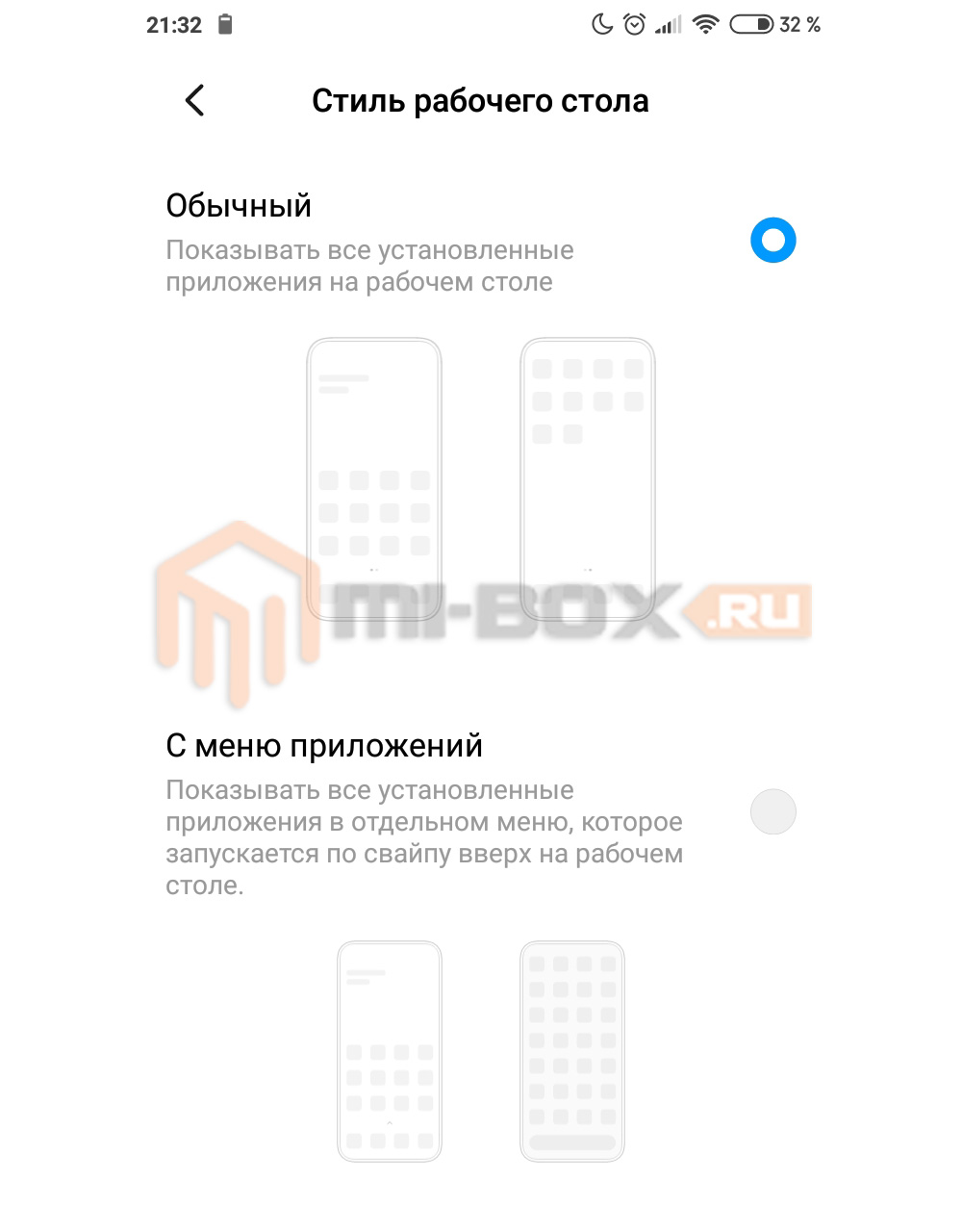
Теперь на выбор доступно два режима отображения приложений:
Для того, чтобы включить меню приложений на Xiaomi необходимо в настройках смартфона зайти в категорию “Рабочий стол” и в разделе “Стиль рабочего стола” переключиться на соответствующий пункт.
Владельцам смартфонов без MIUI 11 или для тех, кто еще не получил данное обновление можно установить другой лаунчер, например, POCO Launcer от Xiaomi.
[Обзор] Функции кнопок MIUI 12 сделают ваш смартфон ещё функциональней
Функции_кнопок_MIUI_12_сделают_ваш_смартфон_ещ.jpg (260.93 KB, Downloads: 15)
2020-12-07 19:09:38 Upload
Салют, Mi-фаны! Приветствую, POCO-фаны!
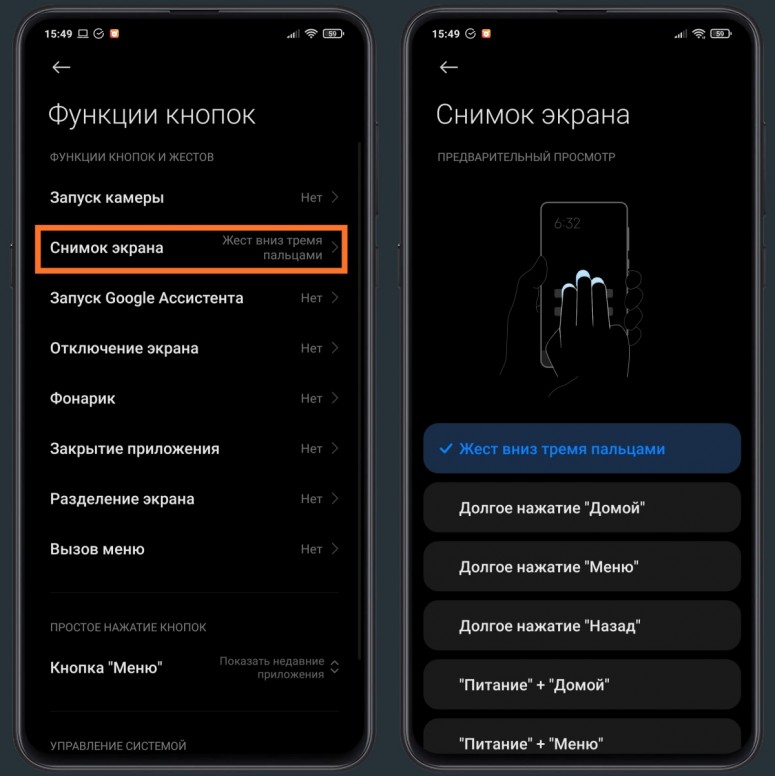
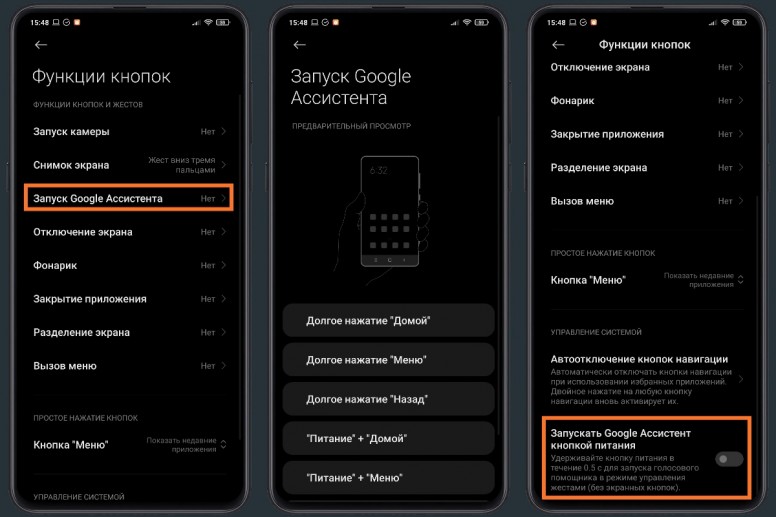
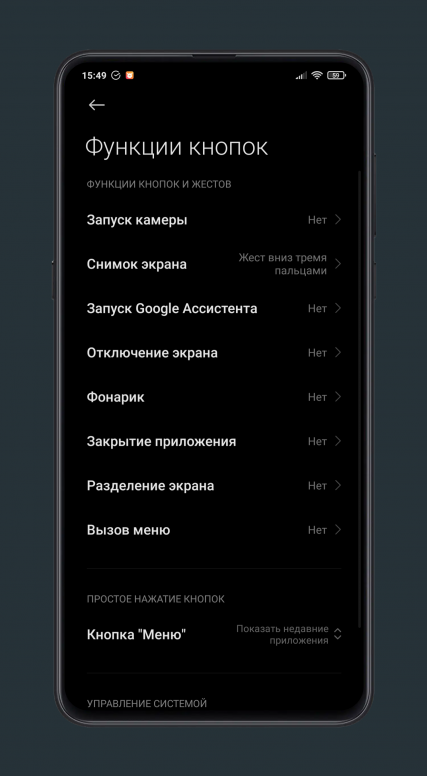
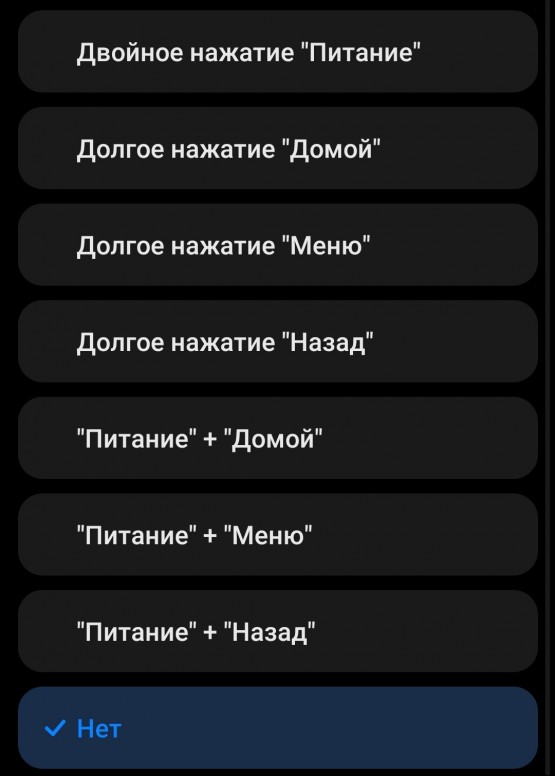
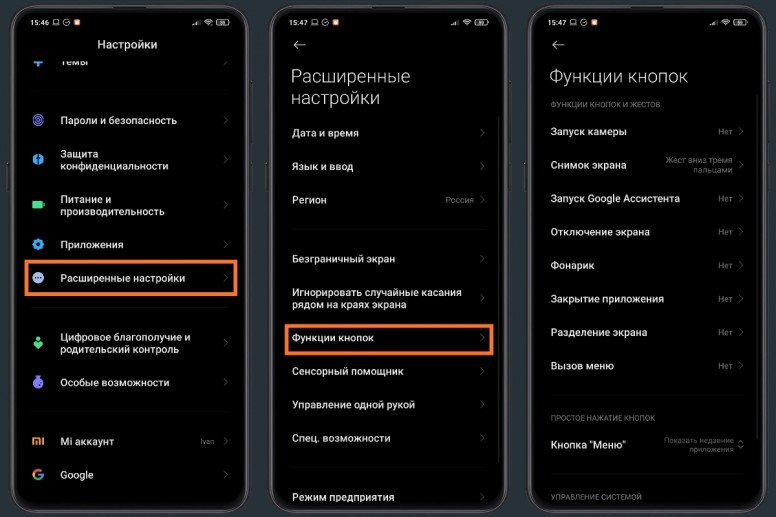
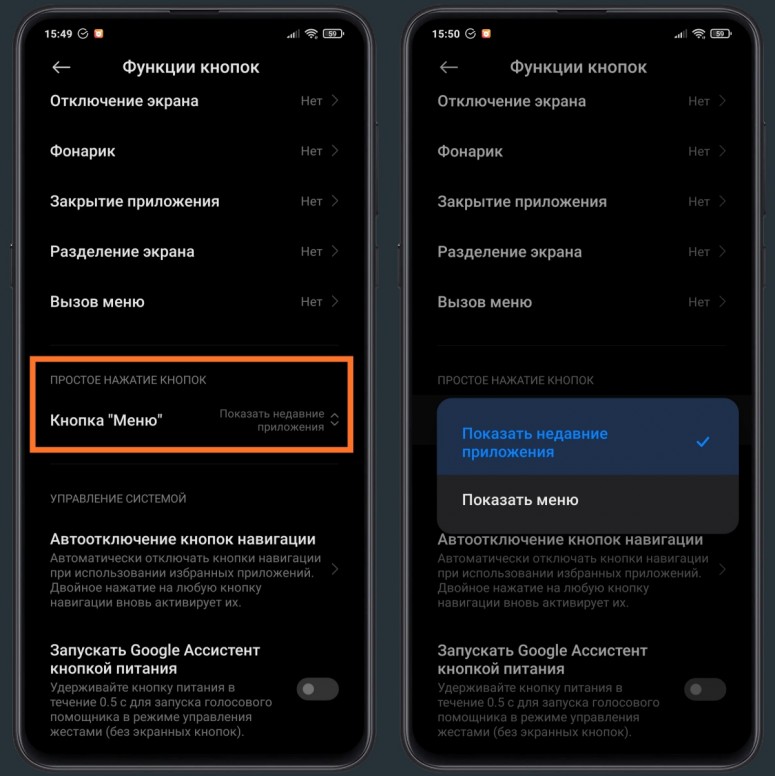
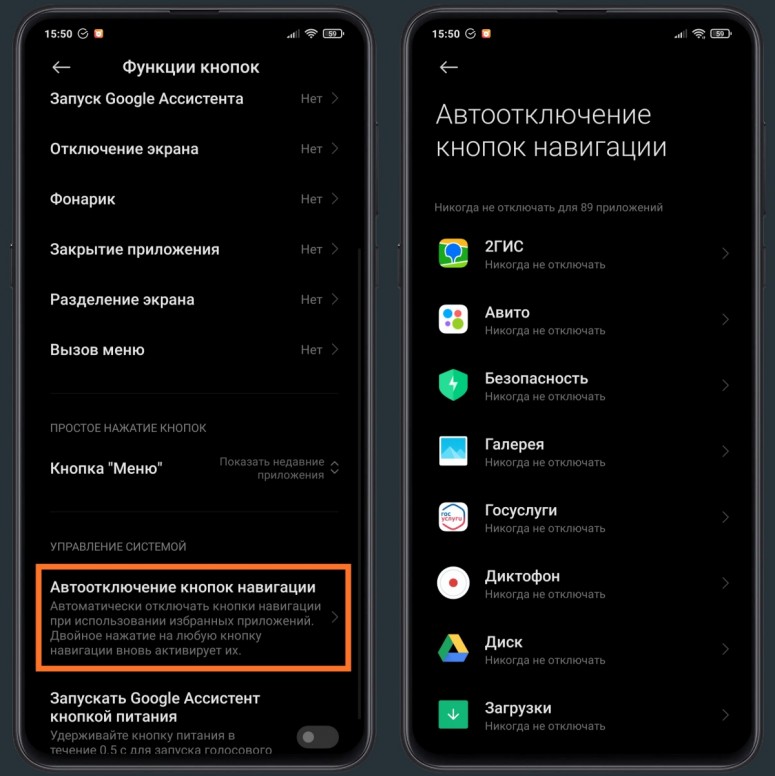
Фирменная оболочка MIUI 12 предлагает широкий список разного рода функций, среди которого имеется такая интересная функциональность как настройка функций кнопок вашего смартфона. Функция так и называется «Функции кнопок». Представьте себе, что кнопки вашего смартфона могут помочь вам в запуске камеры, фонарика, Google ассистента и т.д. И теперь предлагаю рассмотреть подробнее данную функцию.
MIUI_12.png (244.37 KB, Downloads: 18)
2020-12-07 20:12:10 Upload
Функции кнопок 1.jpg (290.3 KB, Downloads: 11)
2020-12-07 20:57:32 Upload
Функции кнопок 5.jpg (267.48 KB, Downloads: 10)
2020-12-07 20:57:50 Upload
1607345528568.png (500.54 KB, Downloads: 21)
2020-12-07 20:58:03 Upload
IMG_20201207_155853.jpg (158.94 KB, Downloads: 18)
2020-12-07 20:59:21 Upload
Функции кнопок 4.jpg (249.81 KB, Downloads: 13)
2020-12-07 20:57:47 Upload
Функции кнопок 2.jpg (362.86 KB, Downloads: 14)
2020-12-07 20:57:39 Upload
Функции кнопок 3.jpg (337.86 KB, Downloads: 14)
2020-12-07 20:57:44 Upload
Настройте кнопки вашего смартфона так, чтобы вам было ещё удобнее им пользоваться.
Рейтинг










Mi Comm APP
Получайте новости о Mi продукции и MIUI
Рекомендации
* Рекомендуется загружать изображения для обложки с разрешением 720*312
Изменения необратимы после отправки
Cookies Preference Center
We use cookies on this website. To learn in detail about how we use cookies, please read our full Cookies Notice. To reject all non-essential cookies simply click «Save and Close» below. To accept or reject cookies by category please simply click on the tabs to the left. You can revisit and change your settings at any time. read more
These cookies are necessary for the website to function and cannot be switched off in our systems. They are usually only set in response to actions made by you which amount to a request for services such as setting your privacy preferences, logging in or filling in formsYou can set your browser to block or alert you about these cookies, but some parts of thesite will not then work. These cookies do not store any personally identifiable information.
These cookies are necessary for the website to function and cannot be switched off in our systems. They are usually only set in response to actions made by you which amount to a request for services such as setting your privacy preferences, logging in or filling in formsYou can set your browser to block or alert you about these cookies, but some parts of thesite will not then work. These cookies do not store any personally identifiable information.
These cookies are necessary for the website to function and cannot be switched off in our systems. They are usually only set in response to actions made by you which amount to a request for services such as setting your privacy preferences, logging in or filling in formsYou can set your browser to block or alert you about these cookies, but some parts of thesite will not then work. These cookies do not store any personally identifiable information.