Указанная тема не существует, или находится на премодерации.
Cookies Preference Center
We use cookies on this website. To learn in detail about how we use cookies, please read our full Cookies Notice. To reject all non-essential cookies simply click «Save and Close» below. To accept or reject cookies by category please simply click on the tabs to the left. You can revisit and change your settings at any time. read more
These cookies are necessary for the website to function and cannot be switched off in our systems. They are usually only set in response to actions made by you which amount to a request for services such as setting your privacy preferences, logging in or filling in formsYou can set your browser to block or alert you about these cookies, but some parts of thesite will not then work. These cookies do not store any personally identifiable information.
These cookies are necessary for the website to function and cannot be switched off in our systems. They are usually only set in response to actions made by you which amount to a request for services such as setting your privacy preferences, logging in or filling in formsYou can set your browser to block or alert you about these cookies, but some parts of thesite will not then work. These cookies do not store any personally identifiable information.
These cookies are necessary for the website to function and cannot be switched off in our systems. They are usually only set in response to actions made by you which amount to a request for services such as setting your privacy preferences, logging in or filling in formsYou can set your browser to block or alert you about these cookies, but some parts of thesite will not then work. These cookies do not store any personally identifiable information.
Здравствуйте, уважаемые Ми-фаны!
logo.png (1.19 MB, Downloads: 14)
2020-12-14 20:43:30 Upload
Наверное, многие видели функцию *Защита приложений* в безопасности и оптимизации, но не все знают, что это и не все используют. Давайте вкратце разберем, что это и с чем его едят ))
02.jpg (266.45 KB, Downloads: 15)
2020-12-14 20:45:02 Upload
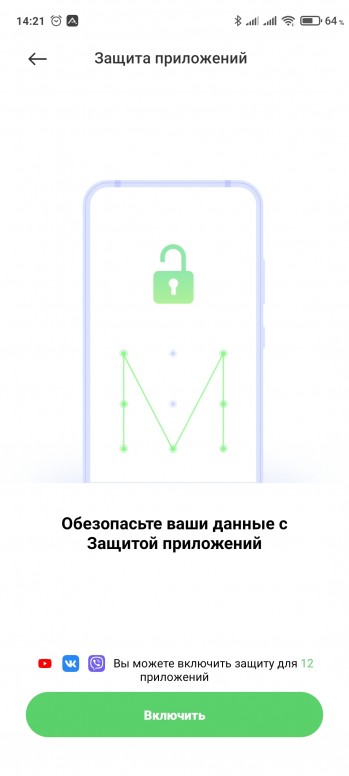
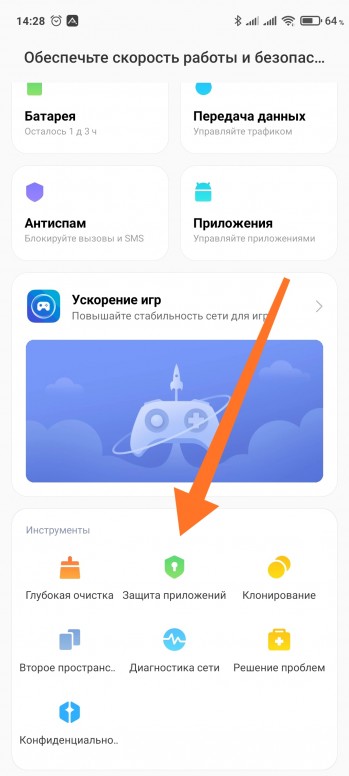
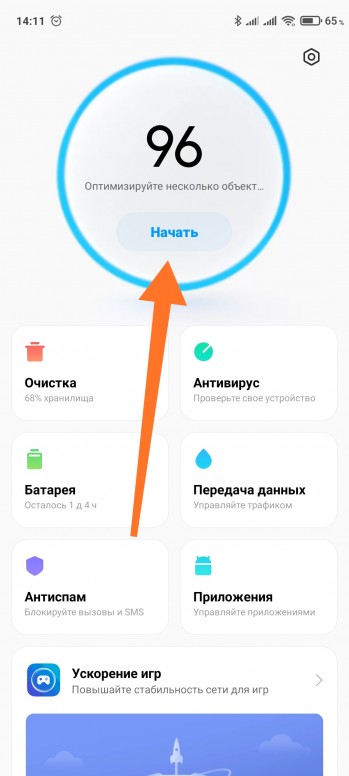
Для начала функцию *Защита приложений* можно найти в безопасности, либо предлагает включить в оптимизации, если еще не включена.
00.jpg (443.17 KB, Downloads: 11)
2020-12-14 20:44:31 Upload
01.jpg (438.7 KB, Downloads: 11)
2020-12-14 20:44:32 Upload
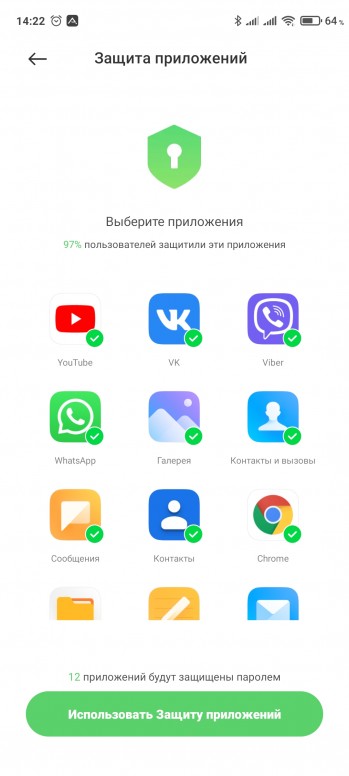
Если включаем первый раз, то будет произведена небольшая настройка, а именно будет запрос на создание ключей/паролей, проверка привязки ми-аккаунта. По умолчанию система предложит наиболее популярные приложения для защиты. Конечно же это будут мессенджеры, почта, галерея, в общем все, что связано с вашими личными данными!
03.jpg (437.68 KB, Downloads: 11)
2020-12-14 20:48:53 Upload
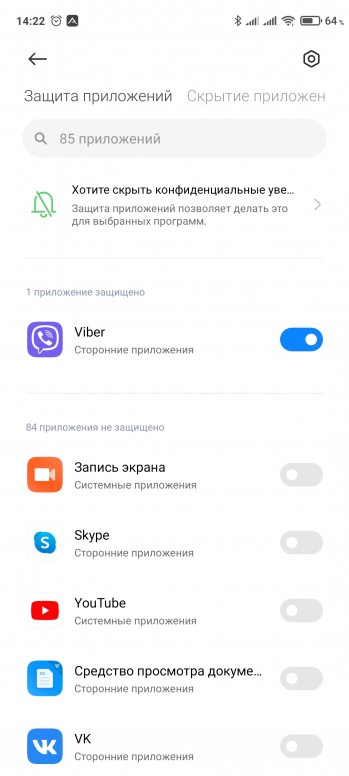
После первоначальной настройки вы можете просто переключателем включить/выключить защиту для нужных приложений!
04.jpg (340.82 KB, Downloads: 13)
2020-12-14 20:49:56 Upload
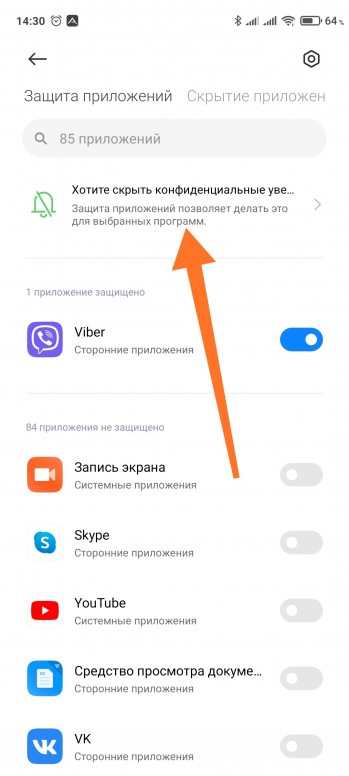
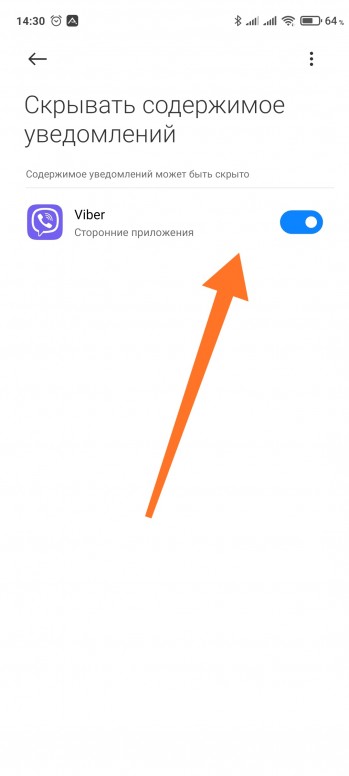
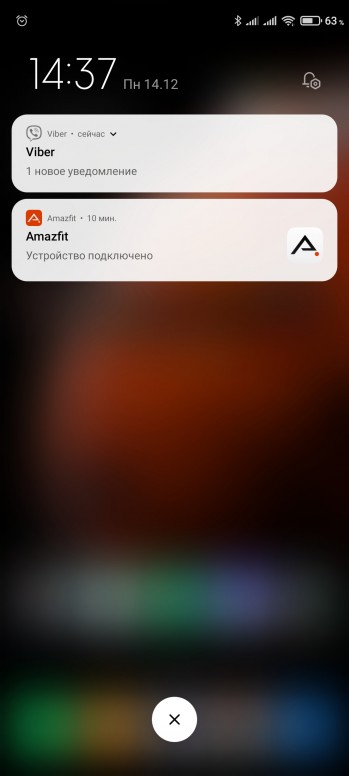
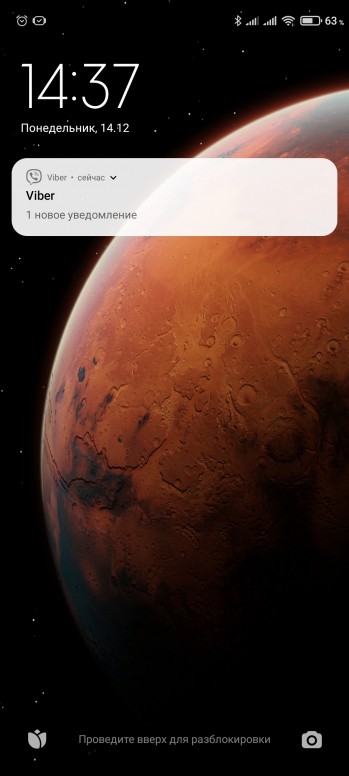
Дополнительно, для защищенных приложений, можем включить скрытие содержимого уведомлений!
05.jpg (381.51 KB, Downloads: 15)
2020-12-14 20:51:28 Upload
06.jpg (186.66 KB, Downloads: 13)
2020-12-14 20:51:28 Upload
Содержимое уведомлений будет скрыто, как на экране блокировки, так и в шторке, даже на разблокированном экране.
07.jpg (551.85 KB, Downloads: 11)
2020-12-14 20:52:47 Upload
08.jpg (1.2 MB, Downloads: 15)
2020-12-14 20:52:57 Upload
IMG_20201214_145414.jpg (313.1 KB, Downloads: 15)
2020-12-14 20:56:35 Upload
Все готово! Надеюсь данная тема была полезна.
Очень полезный функционал, пользуюсь конечно, на определённых приложениях.
Mi Comm APP
Получайте новости о Mi продукции и MIUI
Рекомендации
* Рекомендуется загружать изображения для обложки с разрешением 720*312
Изменения необратимы после отправки
Cookies Preference Center
We use cookies on this website. To learn in detail about how we use cookies, please read our full Cookies Notice. To reject all non-essential cookies simply click «Save and Close» below. To accept or reject cookies by category please simply click on the tabs to the left. You can revisit and change your settings at any time. read more
These cookies are necessary for the website to function and cannot be switched off in our systems. They are usually only set in response to actions made by you which amount to a request for services such as setting your privacy preferences, logging in or filling in formsYou can set your browser to block or alert you about these cookies, but some parts of thesite will not then work. These cookies do not store any personally identifiable information.
These cookies are necessary for the website to function and cannot be switched off in our systems. They are usually only set in response to actions made by you which amount to a request for services such as setting your privacy preferences, logging in or filling in formsYou can set your browser to block or alert you about these cookies, but some parts of thesite will not then work. These cookies do not store any personally identifiable information.
These cookies are necessary for the website to function and cannot be switched off in our systems. They are usually only set in response to actions made by you which amount to a request for services such as setting your privacy preferences, logging in or filling in formsYou can set your browser to block or alert you about these cookies, but some parts of thesite will not then work. These cookies do not store any personally identifiable information.
Здравствуйте, уважаемые Mi фаны!
logo.jpg (258.86 KB, Downloads: 1)
2021-06-29 22:45:23 Upload
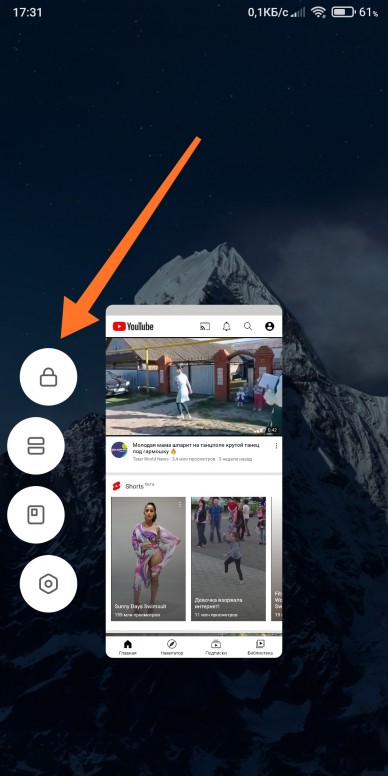
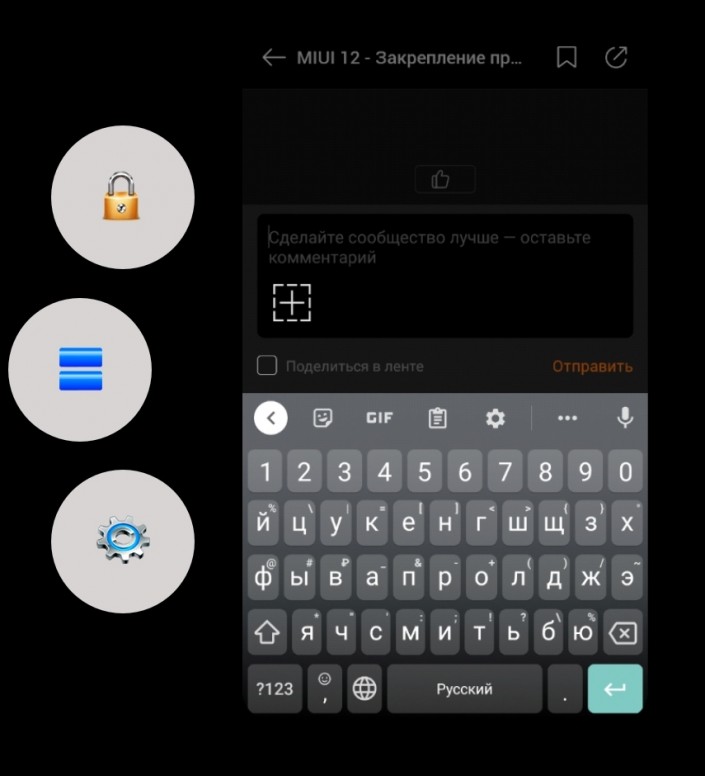
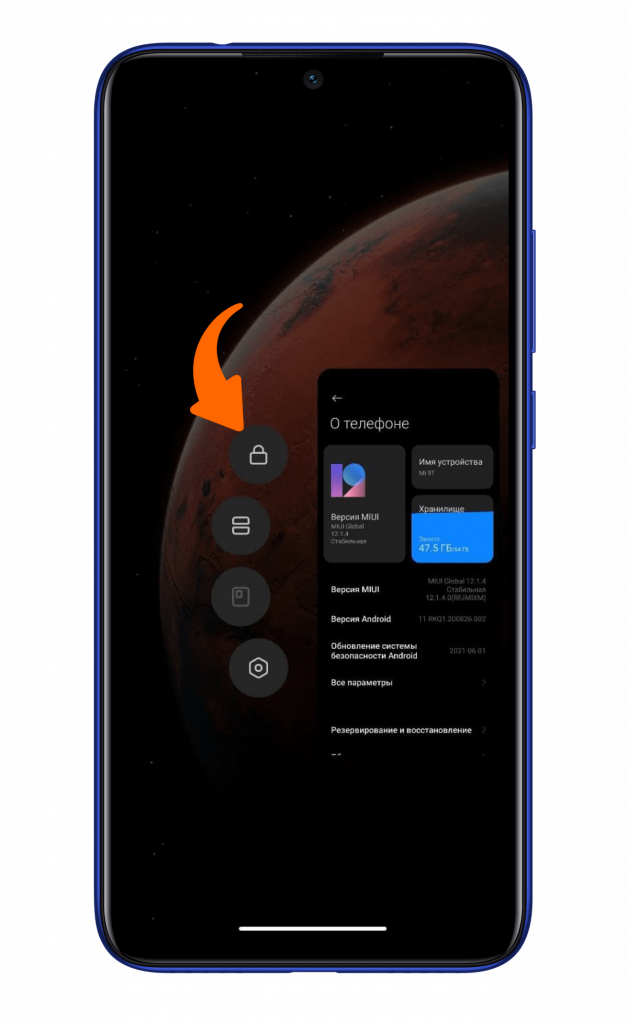
Думаю, многие заметили, что на последних обновлениях MIUI, по каким-то причинам, были скрыты некоторые полезные функции. Например, клонирование приложений, разделение экрана, в том числе и закрепление приложений в недавних (замочек).
06-000.jpg (913.86 KB, Downloads: 0)
2021-06-29 22:45:35 Upload
Притом ситуация может быть совсем смешная, когда какое-то приложение уже было закреплено и, после обновления прошивки, замочек в недавних приложениях просто исчез! Получается нет возможности ни снять его, ни поставить.
На самом деле все не так трагично.
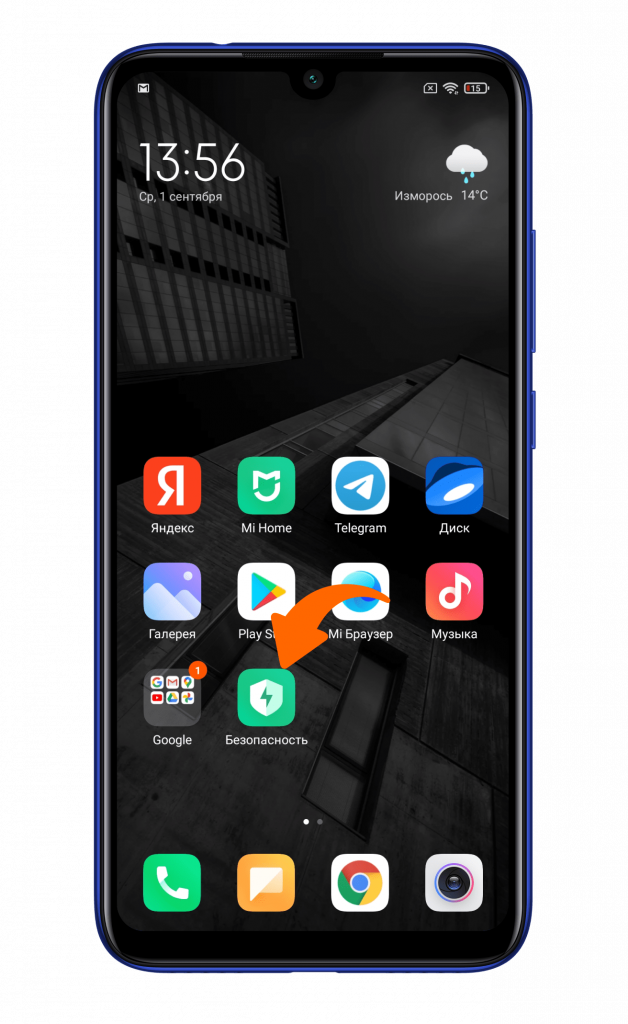
Давайте посмотрим, где можно найти наше закрепление приложений, если у вас пропал данный пункт.
06-001.jpg (543.44 KB, Downloads: 0)
2021-06-29 22:45:35 Upload
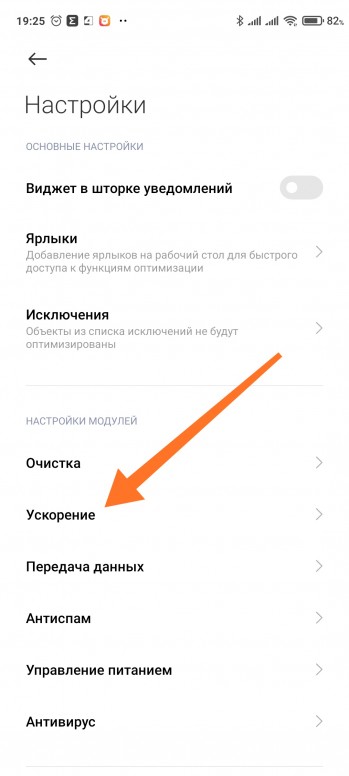
Теперь выбираем пункт Ускорение.
06-002.jpg (264.06 KB, Downloads: 1)
2021-06-29 22:45:35 Upload
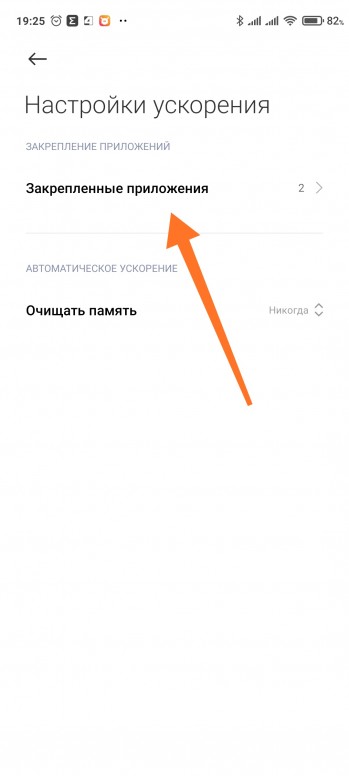
И Закрепленные приложения.
06-003.jpg (179.96 KB, Downloads: 1)
2021-06-29 22:45:35 Upload
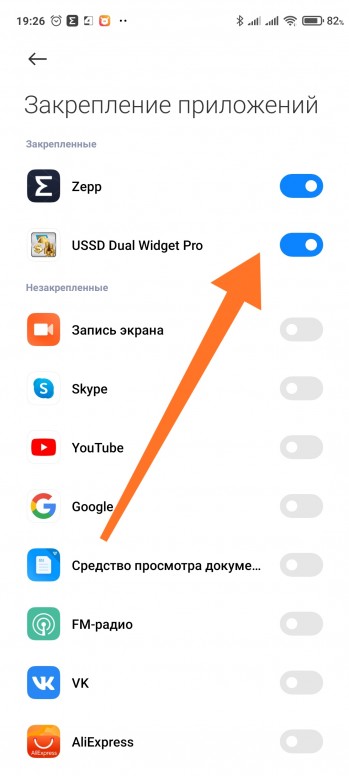
Вот тут и можно включить / отключить закрепление приложений!
06-004.jpg (370.69 KB, Downloads: 0)
2021-06-29 22:45:35 Upload
06-005.jpg (619.64 KB, Downloads: 1)
2021-06-29 22:45:35 Upload
Надеюсь тема была полезная, пишите в комментариях, пользуетесь ли вы данной функцией!
Рейтинг
понятно спасибо, только я в недоумении почему убрали её и возникают такие неудобства.
Познавательно! Сразу вспомнился анекдот про то, как в одной клинике все медицинские манипуляции производились через отдалённое отхожее место.
Хорошо, когда привычных функций не коснулись шаловливые руки разработчиков.
IMG_20210629_192847.jpg (122.08 KB, Downloads: 0)
2021-06-30 00:29:01 Upload
Если честно, то только после прочтения статьи заметил изменения. Стало не удобно. Это печально.
Mi Comm APP
Получайте новости о Mi продукции и MIUI
Рекомендации
* Рекомендуется загружать изображения для обложки с разрешением 720*312
Изменения необратимы после отправки
Cookies Preference Center
We use cookies on this website. To learn in detail about how we use cookies, please read our full Cookies Notice. To reject all non-essential cookies simply click «Save and Close» below. To accept or reject cookies by category please simply click on the tabs to the left. You can revisit and change your settings at any time. read more
These cookies are necessary for the website to function and cannot be switched off in our systems. They are usually only set in response to actions made by you which amount to a request for services such as setting your privacy preferences, logging in or filling in formsYou can set your browser to block or alert you about these cookies, but some parts of thesite will not then work. These cookies do not store any personally identifiable information.
These cookies are necessary for the website to function and cannot be switched off in our systems. They are usually only set in response to actions made by you which amount to a request for services such as setting your privacy preferences, logging in or filling in formsYou can set your browser to block or alert you about these cookies, but some parts of thesite will not then work. These cookies do not store any personally identifiable information.
These cookies are necessary for the website to function and cannot be switched off in our systems. They are usually only set in response to actions made by you which amount to a request for services such as setting your privacy preferences, logging in or filling in formsYou can set your browser to block or alert you about these cookies, but some parts of thesite will not then work. These cookies do not store any personally identifiable information.
Здравствуйте, уважаемые Mi фаны!
logo.jpg (258.86 KB, Downloads: 1)
2021-06-29 22:45:23 Upload
Думаю, многие заметили, что на последних обновлениях MIUI, по каким-то причинам, были скрыты некоторые полезные функции. Например, клонирование приложений, разделение экрана, в том числе и закрепление приложений в недавних (замочек).
06-000.jpg (913.86 KB, Downloads: 0)
2021-06-29 22:45:35 Upload
Притом ситуация может быть совсем смешная, когда какое-то приложение уже было закреплено и, после обновления прошивки, замочек в недавних приложениях просто исчез! Получается нет возможности ни снять его, ни поставить.
На самом деле все не так трагично.
Давайте посмотрим, где можно найти наше закрепление приложений, если у вас пропал данный пункт.
06-001.jpg (543.44 KB, Downloads: 0)
2021-06-29 22:45:35 Upload
Теперь выбираем пункт Ускорение.
06-002.jpg (264.06 KB, Downloads: 1)
2021-06-29 22:45:35 Upload
И Закрепленные приложения.
06-003.jpg (179.96 KB, Downloads: 1)
2021-06-29 22:45:35 Upload
Вот тут и можно включить / отключить закрепление приложений!
06-004.jpg (370.69 KB, Downloads: 0)
2021-06-29 22:45:35 Upload
06-005.jpg (619.64 KB, Downloads: 1)
2021-06-29 22:45:35 Upload
Надеюсь тема была полезная, пишите в комментариях, пользуетесь ли вы данной функцией!
Рейтинг
понятно спасибо, только я в недоумении почему убрали её и возникают такие неудобства.
Познавательно! Сразу вспомнился анекдот про то, как в одной клинике все медицинские манипуляции производились через отдалённое отхожее место.
Хорошо, когда привычных функций не коснулись шаловливые руки разработчиков.
IMG_20210629_192847.jpg (122.08 KB, Downloads: 0)
2021-06-30 00:29:01 Upload
Если честно, то только после прочтения статьи заметил изменения. Стало не удобно. Это печально.
Mi Comm APP
Получайте новости о Mi продукции и MIUI
Рекомендации
* Рекомендуется загружать изображения для обложки с разрешением 720*312
Изменения необратимы после отправки
Cookies Preference Center
We use cookies on this website. To learn in detail about how we use cookies, please read our full Cookies Notice. To reject all non-essential cookies simply click «Save and Close» below. To accept or reject cookies by category please simply click on the tabs to the left. You can revisit and change your settings at any time. read more
These cookies are necessary for the website to function and cannot be switched off in our systems. They are usually only set in response to actions made by you which amount to a request for services such as setting your privacy preferences, logging in or filling in formsYou can set your browser to block or alert you about these cookies, but some parts of thesite will not then work. These cookies do not store any personally identifiable information.
These cookies are necessary for the website to function and cannot be switched off in our systems. They are usually only set in response to actions made by you which amount to a request for services such as setting your privacy preferences, logging in or filling in formsYou can set your browser to block or alert you about these cookies, but some parts of thesite will not then work. These cookies do not store any personally identifiable information.
These cookies are necessary for the website to function and cannot be switched off in our systems. They are usually only set in response to actions made by you which amount to a request for services such as setting your privacy preferences, logging in or filling in formsYou can set your browser to block or alert you about these cookies, but some parts of thesite will not then work. These cookies do not store any personally identifiable information.
📌 Как закрепить приложение в оперативной памяти на MIUI 12.5
В предыдущих версиях фирменной оболочки MIUI закрепить приложение в памяти можно было в меню многозадачности, кликнув на иконку с замочком после удержания на окно приложения. А как это сделать на смартфоне Xiaomi с MIUI 12.5, читайте далее.
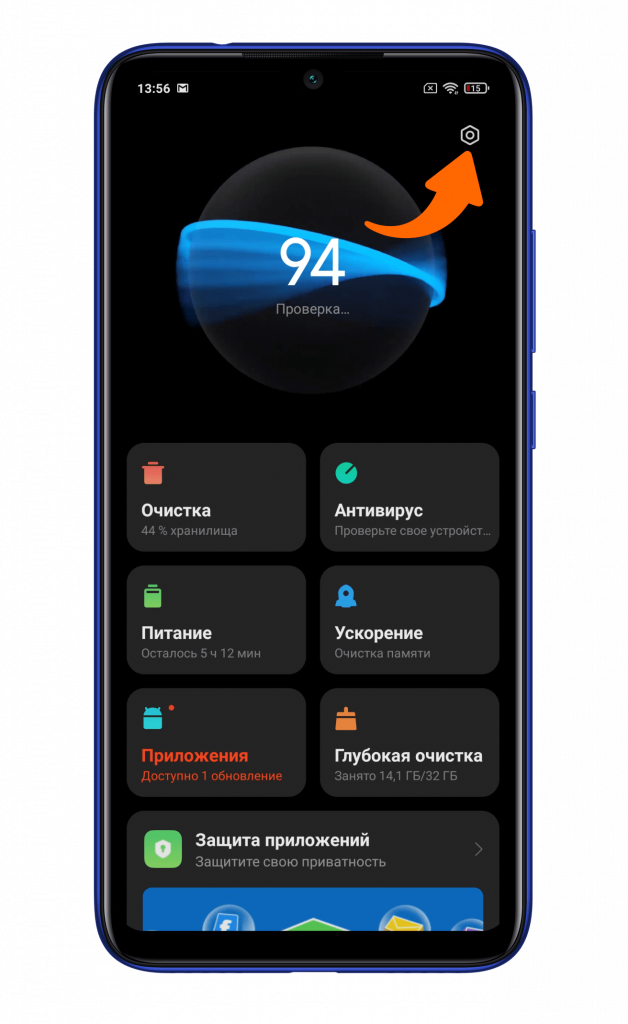
В обновленном интерфейсе MIUI 12.5 при удержании на окно приложения появляются сведения о нем без дополнительных иконок быстрого действия. Теперь для закрепления приложения в оперативной памяти вам понадобится фирменное приложение «Безопасность».
Кликаете на шестеренку в правом верхнем углу.
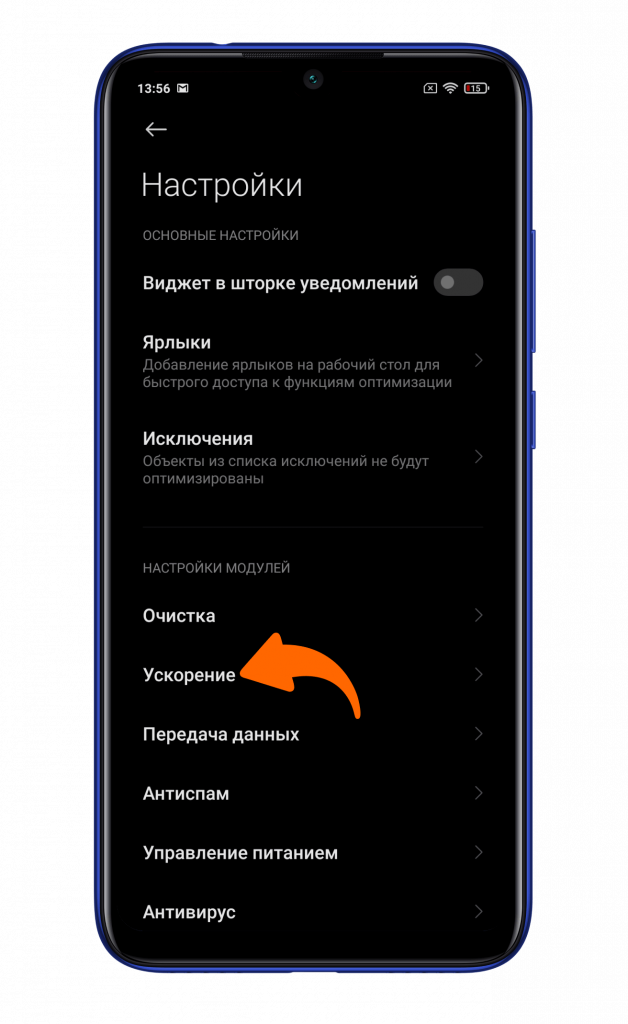
Находите пункт ускорение.
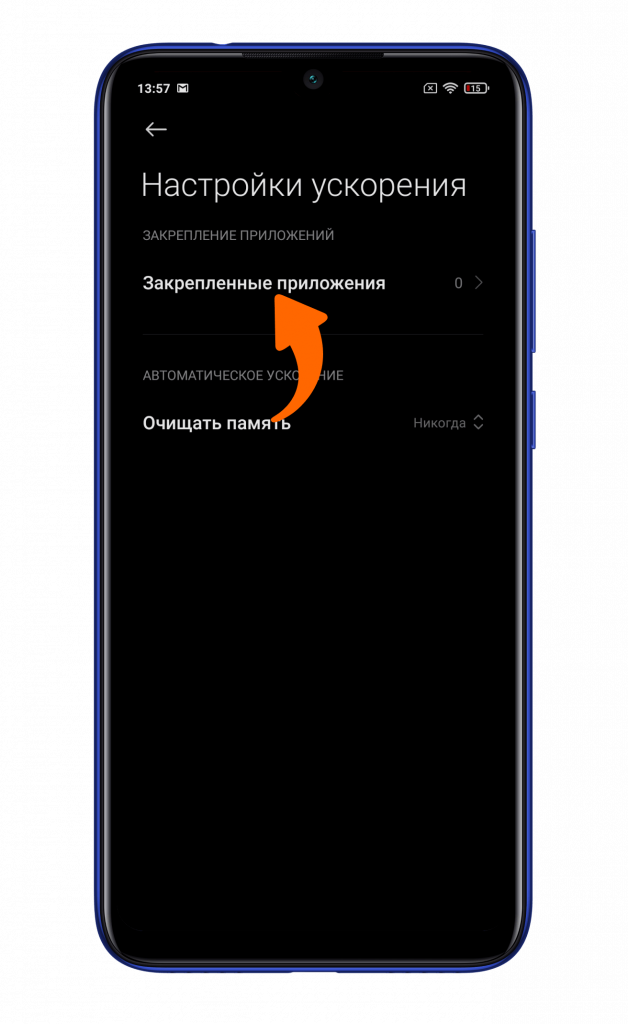
Нажимаете на строку «Закрепленные приложения».
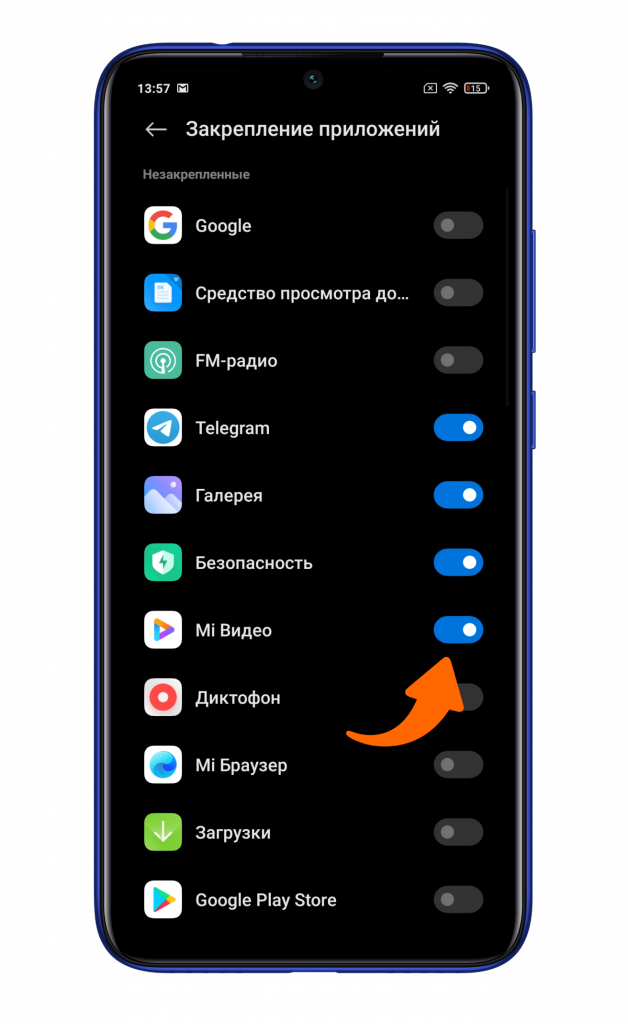
Активируете чек-боксы напротив нужного вам приложения.
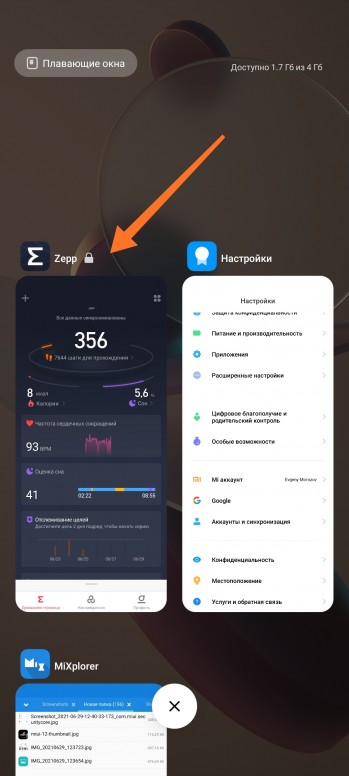
Теперь выбранные вами приложения будут зафиксированы в оперативной памяти смартфона Сяоми. Свидетельством этому будет иконка замка около приложения в меню многозадачности.